Face Emotions
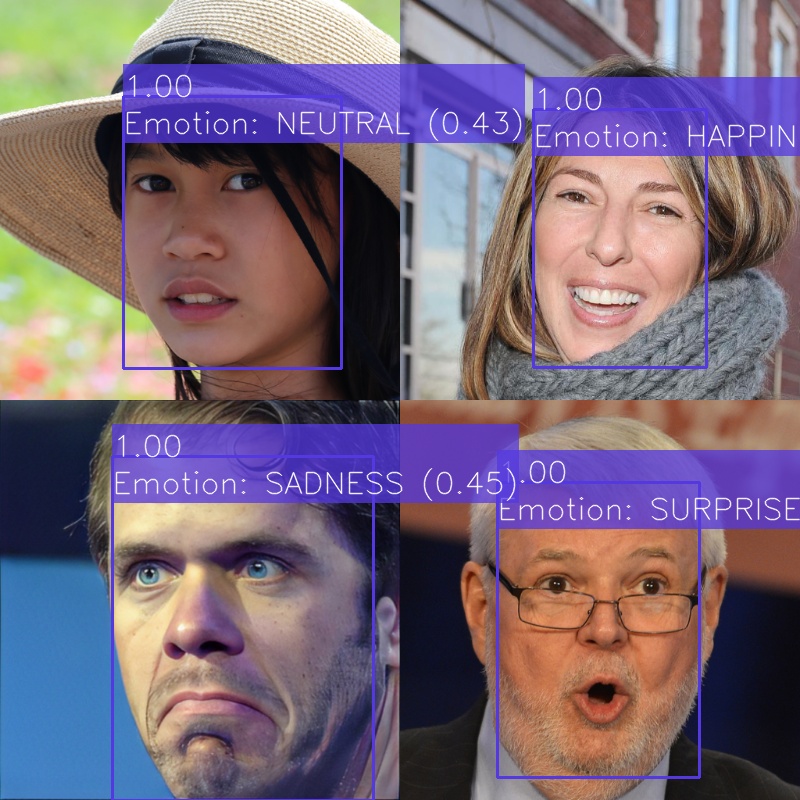
This Project aims to detect faces in images and infer their emotion.
Data models
This project uses the Face data model.
Configuration
This project uses a configuration YAML with the following fields:
face_emotions: Specifies the name and parameters of the emotion classification model. It must have the following fields:model_name: Name of the model.params: The parameters of the models’ python class.
face_detector: Specifies the name and parameters of the face detector model. It must have the following fields:face_box_scale: Scale factor to apply to the face bounding box.model_name: Name of the model.params: The parameters of the models’ python class.
context_broker:host: IP address of the Context Broker.port: Port of the Context Broker.notification_uri: URI where the subscription notifications will be sent.check_subscription_conflicts: Flag if the subscription conflicts should be checked before creating them.
api:host: Bind IP address of the API server.port: Bind port of the API server.allowed_origins: List of origins that should be permitted to make cross-origin requests.local_image_storage: Flags if the images are stored locally and can be accessed by their path or must be retrieved from a URL.post_new_entity: Create a new Face entity in the context broker with the predicted emotion when processing a Face entity.update_entity: Update the Face entity in the context broker with the predicted emotion when processing a Face entity.
subscriptions: List of subscriptions to create on the context broker. Each element can have the following fields:entity_type: Entity type to subscribe to.watched_attributes: List of attributes to subscribe to.query: Query to filter the entities to subscribe to.
Example:
face_emotions:
  model_name: emotions_hse
  params:
    model_path: ../../../data/models/emotions_hse/mobilenet_7.h5
    use_cuda: False

face_detector:
  face_box_scale: 1.2
  model_name: face_detector_retinaface
  params:
    weights_path: ../../../data/models/face_detector_retinaface/Resnet50_Final.pth
    model_name: resnet50
    confidence_threshold: 0.7
    landmarks: False
    nms_threshold: 0.4
    use_cuda: False

context_broker:
  host: 192.168.0.100
  port: 1026
  notification_uri: http://192.168.0.100:8080/ngsi-ld/v1/notify
  check_subscription_conflicts: True

api:
  host: 0.0.0.0
  port: 8080
  allowed_origins: []
  local_image_storage: True
  post_new_entity: False
  update_entity: True

subscriptions:
  - entity_type: Image
    watched_attributes: ["purpose"]
    query: "purpose==%22FaceEmotions%22"
API
The API allows the Project to be executed as a service. It has automatic and interactive documentation generated with swagger-ui on /docs and redoc on /redoc.
It can be executed with api.py. The --help option can be used to get a list of accepted arguments:
python api.py --help
usage: api.py [-h] [--config CONFIG] [--log-level {DEBUG,INFO,WARN,ERROR,CRITICAL}]

optional arguments:
  -h, --help            show this help message and exit
  --config CONFIG       Path to the configuration yaml (default: 'config.yaml')
  --log-level {DEBUG,INFO,WARN,ERROR,CRITICAL}
                        Log level (default: INFO)
Endpoints
GET/Returns the name and version of the API.
Response
application/json
{
  "title": "Face Emotions API",
  "version": "0.2.0"
}
POST/predictIf an image entity is provided, it predicts the position (bounding box) of faces in the image and classifies their emotion. If a Face entity is provided, it uses the existing bounding box to get an image of the face and classify its emotion.
It returns a list of data models for each detection. The response type can be specified with the
acceptheader (application/jsonorapplication/ld+json).Request body
A JSON with the following fields:
entity_id: The id of an image or a Face entity in the context broker to classify its emotion.post_to_broker: Flag if the generated data models should be posted to the context broker. Defaults totrue.
application/json
{
  "entity_id": "string",
  "post_to_broker": true
}
Response
A list with the generated data models (one for each face) with the following fields:
id: The id of the entity on the context broker.dateObserved: The date when the data model was generated.type: The type of the data model (Face).image: The id of the source image entity.boundingBox: The bounding box of the face in the image with relative image coordinates.detectionConfidence: The confidence of the detection.emotion: The predicted emotion.emotionConfidence: The confidence of the emotion classification.
application/json
[
  {
    "id": "urn:ngsi-ld:Face:CT_KTutLEe2TrTvkWs4Rlg",
    "dateObserved": "2023-05-05T13:45:02.859485",
    "type": "Face",
    "image": "urn:ngsi-ld:Image:gGbP8W5_WWUqTj_YXX2KozfcPuXeVVQ_aT9isawAKXw",
    "boundingBox": {
      "xmin": 0.3010279001468429,
      "ymin": 0.29523809523809524,
      "xmax": 0.7165932452276065,
      "ymax": 0.8809523809523809
    },
    "detectionConfidence": 0.9994341731071472,
    "age": null,
    "gender": null,
    "genderConfidence": null,
    "emotion": "HAPPINESS",
    "emotionConfidence": 0.9358749985694885,
    "features": null,
    "featuresAlgorithm": null,
    "recognitionDomain": null,
    "recognized": false,
    "recognizedDistance": null,
    "recognizedPerson": null
  }
]
application/ld+json
[
  {
    "id": "urn:ngsi-ld:Face:HPFXt~tLEe2o1DvkWs4Rlg",
    "type": "Face",
    "@context": [
      "https://uri.etsi.org/ngsi-ld/v1/ngsi-ld-core-context.jsonld"
    ],
    "dateObserved": {
      "type": "Property",
      "value": {
        "@type": "DateTime",
        "@value": "2023-05-05T13:45:35Z"
      }
    },
    "image": {
      "type": "Relationship",
      "object": "urn:ngsi-ld:Image:gGbP8W5_WWUqTj_YXX2KozfcPuXeVVQ_aT9isawAKXw"
    },
    "boundingBox": {
      "type": "Property",
      "value": {
        "xmin": 0.3010279001468429,
        "ymin": 0.29523809523809524,
        "xmax": 0.7165932452276065,
        "ymax": 0.8809523809523809
      }
    },
    "detectionConfidence": {
      "type": "Property",
      "value": 0.9994341731071472
    },
    "emotion": {
      "type": "Property",
      "value": "HAPPINESS"
    },
    "emotionConfidence": {
      "type": "Property",
      "value": 0.9358749985694885
    },
    "recognized": {
      "type": "Property",
      "value": false
    },
    "dateModified": {
      "type": "Property",
      "value": {
        "@type": "DateTime",
        "@value": "2023-05-05T13:45:35Z"
      }
    },
    "dateCreated": {
      "type": "Property",
      "value": {
        "@type": "DateTime",
        "@value": "2023-05-05T13:45:35Z"
      }
    }
  }
]
POST/ngsi-ld/v1/notifyRoute to notify the activation of a subscription from a context broker.
Query parameters
subscriptionId: The id of the subscription.Request body
A JSON with the following fields:
id: The id of the notification.type:Notification.subscriptionId: The id of the subscription.notifiedAt: The date when the notification was sent.data: A list with the entities notified.
application/json
{
  "id": "string",
  "type": "Notification",
  "subscriptionId": "string",
  "notifiedAt": "string",
  "data": []
}
Response
204no content: If the notification was processed successfully.